Showing posts with label Virtualization. Show all posts

Tuesday, November 11, 2008

Running VMWare ESXi on Low End Hosts

In order to evaluate ESXi for use in test environments, I had installed it on a low end host (a DELL Optiplex GX520 desktop) and tried to run two virtual machines on it. However, when I would try to start the second virtual machine, it would throw an “Admission check failed for Memory Resource” error on me. I wasn’t able to figure out why this was happening as I had run two virtual machines with the same configuration on a host with similar resources using VMWare Server.

All that needs to be done is to modify the memory reservation in the resource allocation tab
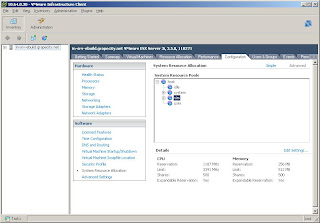
1. Open the VMWare Infrastructure interface to the ESXi server
2. Select Configuration >> System Resource Allocation >>Advanced
3. Click on Edit Settings and edit the memory reservation and change it to 256 MB or lower (as per requirement)

Monday, January 22, 2007

Deploying a Windows 2003 cluster using VMWare

I was once assigned to test an application which was to be deployed on a clustered Windows 2003 environment. The budget at that time did not allow us the luxury of having dedicated hardware for the clustering so we had to workaround the situation by using a virtual environment. I was able to find this wonderful article by Roudy Bob on Setting Up A Windows Server 2003 Cluster in VS 2005 - Part I but was not able to perform the same using VMWare.
Whenever a virtual machine was powered on, it used to lock the vmdk files thus not allowing the second node in the clustered to be powered. After some searching on various blogs, I was able to work around this problem by modifying the vmx file of the virtual machine to include the following statements (without the comments)

scsi0:sharedbus="virtual" //this shares the whole scsi bus 0
scsi0:0.shared="true" //this shares the scsi0 port 0
disk.locking="false" //for disk.

Monday, January 16, 2006

VMWare Player

I recently downloaded the latest version of VMWare WorkStation and there was this new utility called VMWare Player that was available for download. This was the coolest virtualization utility that I had ever encountered so far. There were options to open VMC (Microsoft Virtual PC machine configuration) files too. I tried running a couple of machines using that and they ran without any problems.
More information in this regard would be available at :

http://www.vmware.com/products/player/

Sunday, December 04, 2005

CompactFramework and Virtual Machines

I have worked for quite some time on Virtual machines and have also worked on CompactFramework in Dotnet. However I have never been able to run an emulator on a virtual machine using DotNET 1.x. There were many explanations that I had come across in this regard
1. There cant be two layers of virtualization.
2. The WinCE emulator uses the same engine as Virtual PC. (Both have been developed by Connectix). Virtual PC2004 and Virtual Server 2005 are based on this engine and so it is not able to run a copy of the emulator inside itself.

However I did some research on this and was not convinced with either of the reasons. VS.NET 2.0 (Whidbey) allows an emulator to be run from within a Virtual machine. The reason may be that this uses a different emulation engine. Also, when I had tried to run an emulator from a VMWare virtual machine, it failed to run on that too. I feel that I need to gain more gyan on this.